Video games
How to enable 1080p in Nintendo Switch 2 handheld mode (v22.0.0)
Enable Handheld Mode Enhancement in Nintendo Switch 2 v22.0.0 for compatible games: setup steps, battery impact, and the rest of the update.
Quick summary
Nintendo Switch 2 update v22.0.0 adds Handheld Mode Enhancement, allowing compatible original Switch games to run with a TV-like performance profile and target up to 1080p in handheld mode.
What matters most
Nintendo Switch 2 received v22.0.0 on March 17, 2026. One of its most relevant features for portable play is Handheld Mode Enhancement.
When enabled, supported Nintendo Switch games can use behavior closer to TV mode while you play undocked. In supported cases, this improves image sharpness, but it also increases power usage.
What changes with Handheld Mode Enhancement
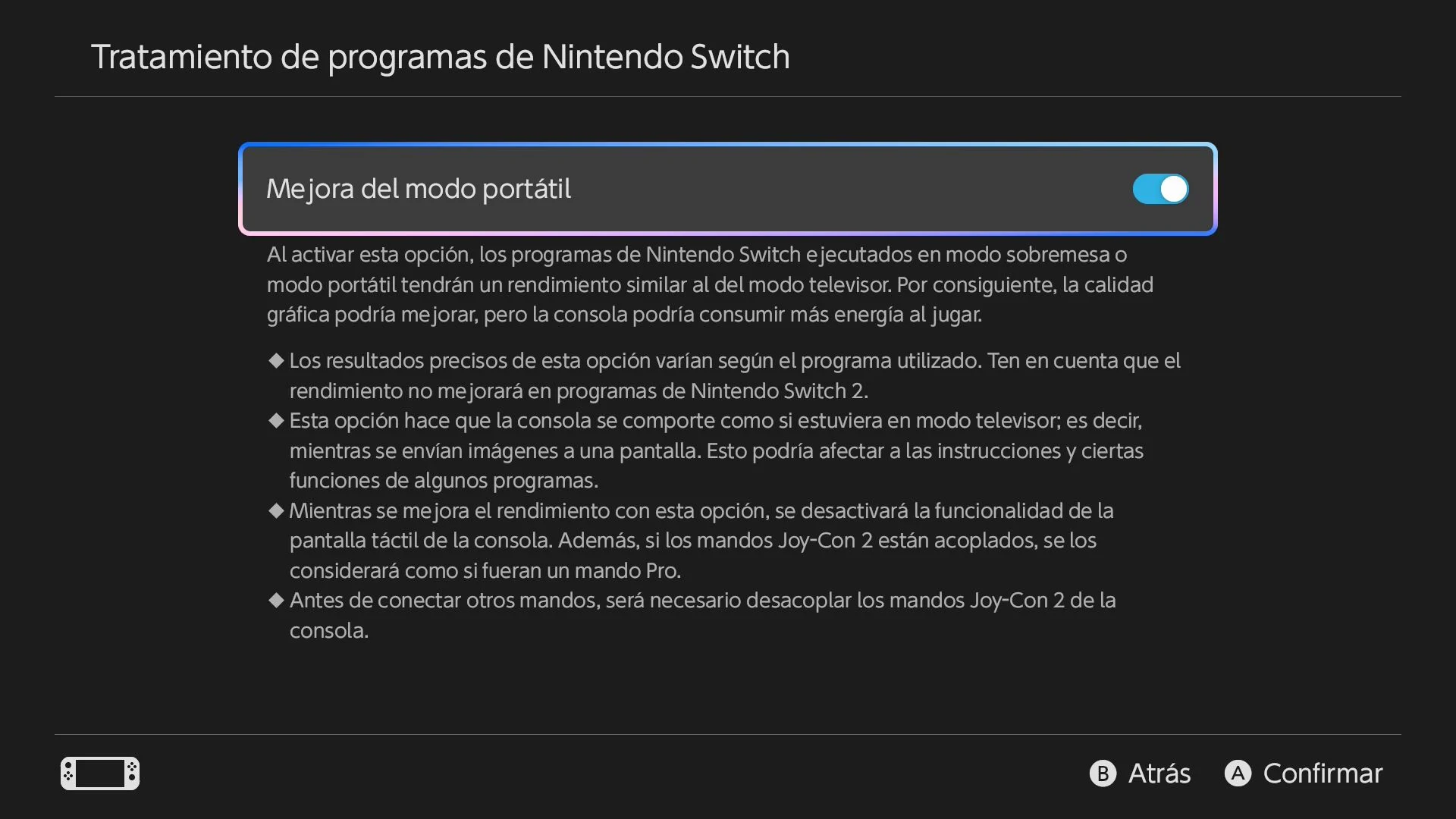
When you enable this option in Nintendo Switch software settings, the console changes the performance profile for compatible games. Instead of standard handheld limits, it uses a TV-mode-oriented profile.
According to the official patch notes, compatible games can target up to 1080p in handheld mode.
Battery impact: more processing, higher drain
Enabling this option increases battery usage because the device does more graphics work. Nintendo notes that power consumption can be similar to native Switch 2 titles in some cases.
How to enable 1080p handheld mode on Nintendo Switch 2
If you already installed v22.0.0, follow these steps:
1. Open System Settings from the home menu. 2. Go to Console in the left sidebar. 3. Find Nintendo Switch software settings. 4. Set Handheld Mode Enhancement to On.
The enhancement will then apply to compatible previous-generation games.
Other changes in version 22.0.0
Besides handheld performance, v22.0.0 includes updates in communication, accessibility, multimedia, and system behavior:
- GameChat: invite friends to active sessions even if they have not finished initial setup.
- GameChat: improved image quality when sharing enlarged gameplay screens.
- Accessibility: voice-to-text support for Portuguese and Russian.
- Media and Album:
- ZL/ZR controls to jump 10 seconds while watching videos in eShop and News.
- Automatic cloud sync for edited videos and captioned captures.
System and storage updates
The patch also includes:
Parental Controls mobile app also gains push notifications when the console password is entered correctly.
- More detailed storage breakdown for internal memory and microSD Express cards.
- Airplane Mode now remembers per-feature preferences for Bluetooth, Wi‑Fi, and NFC.
- Linear PCM 5.1 sound test setup.
- Regional setting update for Southeast Asia.
Practical recommendation
If you want to test 1080p-style handheld output in supported games, install v22.0.0, enable Handheld Mode Enhancement, and expect higher battery usage due to increased graphics processing.